Infrastructure as code (IaC) is a type of IT setup wherein developers or operations teams automatically manage and provision the technology stack for an application through software, rather than using a manual process to configure discrete hardware devices and operating systems.
Requirement of automation
- Increasingly crucial to automate
Applications can be deployed up to hundreds of times per day. - Infrastructure is fleeting
It can be provisioned or de-provisioned in response to load.
Example
- An application on a public cloud:
- build on Kubernetes
- bring on a VM (some legacy)
- and add VPC to connect them
- Then you need exactly the same test environment
- manual repeating documented steps may contain human-factor errors
Imperative approach
Intuitive, step-by-step way.
Example:
CLI along with a bash script like:
cli create vm
cli configure vm
...
cli create vpc
cli configure vpc
...
cli create db
cli configure db
...
Disadvantages:
- When you need to scale it up or down you need to write custom scripts.
- Doesn't scale well.
- If you run multiple times, it will create each time.
- You have to add error handling when one of the steps fails halfway.
Declarative approach
- Define the final state of your infrastructure.
- It lets the provider handle the rest.
- Managed through simple config maps.
vm:
  config: ...
vpc:
  config: ...
db:
  config: ...
...
Advantages:
- No matter how many times you run provisioning you end up with the same infrastructure. Example: run it later to ensure the infrastructure hasn't changed
Implementation in DevOps
Example:
Perfect agile DevOps flow:
- -> write code
- -> test
- -> deploy to production
With a legacy infrastructure:
- you have to open a ticket when you need a new VM
- that holds you back
With IaC (the best approach):
- you treat the infrastructure with the same quality as you treat your code
- versioning with Git
- tracking changes
Immutable & mutable infrastructure
Example:
You add a database to your infrastructure: VM, VPC + database. Scale it 1000 times.
Mutable approach - environment (configuration) drift (move the infrastructure from V1 to V2 with a mutation custom script):
- 99% it is working, but 1% failing in a limbo state.
- Existing environment no longer matches what we have in our automation.
- To debug you would have to:
- wipe out the entire environment
- redeploy V1
- run those scripts
- When moving to scale it becomes incredibly hard to maintain.
Immutable approach - a new environment alongside the old one:
- When they are both working you bring down the older version.
- It is expensive (V1 and V2 are running at the same time).
- But it's a best practice to ensure that your infrastructure can scale.
Managing development virtual environment with Vagrant
Vagrant - a tool for building and managing virtual machine environments in a single workflow.
Benefits:
- automate prod-like environments
- easy to configure
- portable
Vagrant workflow
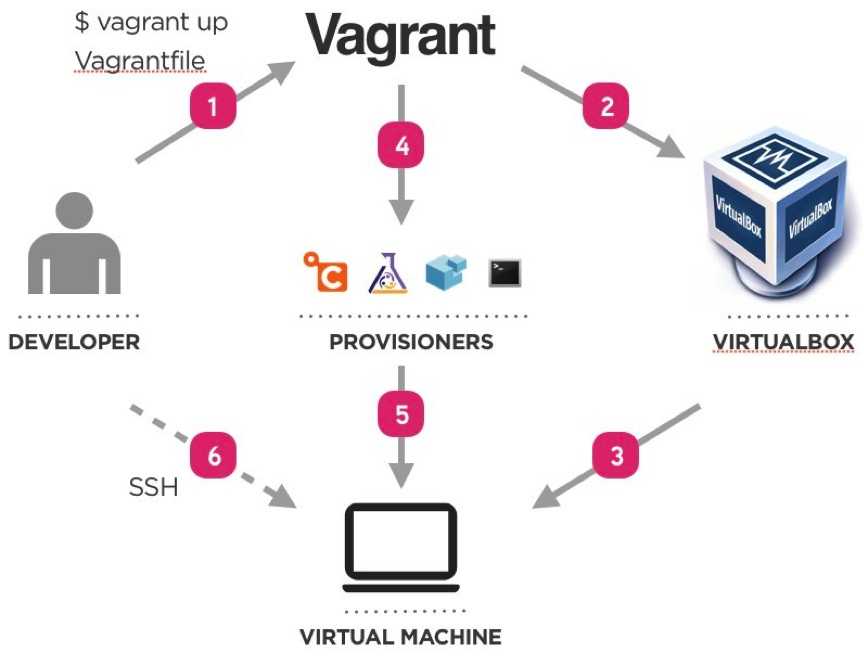
Vagrant components
- host and guest machines
- Vagrantfile - configuration (on Ruby)
- Box - OS and version
- Providers - VM hypervisor (VirtualBox, VMware, libvirt)
- Provisioners:
- shell
- Ansible
- Chef
- Puppet
- ...
Vagrant basic commands
vagrant up- Start and provision VMvagrant destroy- Destroy VMsvagrant status- Check VMs statusvagrant ssh <VM_NAME>- SSH as the vagrant uservagrant halt- stop the VMs
Vagrant Provisioners
Provisioners in Vagrant allow you to automatically install software, alter configurations, and more on the machine as part of the vagrant up process.
Read more about Vagrant Provisioning
Provisioning with Ansible
Ansible is an automation engine that automates:
- cloud provisioning
- configuration management
- application deployment
- intra-service orchestration
- many other IT needs ...
Advantages:
- no-agent to install on machines, SSH only
- write configuration (playbooks) on YAML - easy to learn
Ansible components
- Module - units of code providing a narrow functionality (e.g. the
yummodule installs packages using the yum package manager). - Task - execution of one module with a set of arguments.
- Playbook - set of tasks in YAML.
- Role - set of playbooks to be run on a group of hosts.
- Host - a machine that Ansible will configure through SSH.
- Inventory - definition of the hosts and variables to be used in the playbooks.
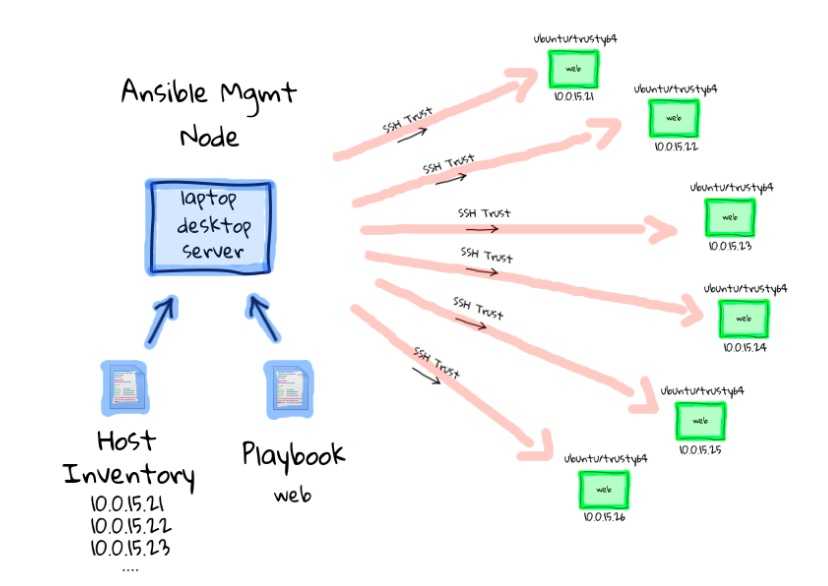
Example Ansible project tree
run.yml
roles/
  common/
    tasks/
    handlers/
    files/
    templates/
    vars/
    defaults/
    meta/
  webservers/
    tasks/
    defaults/
    meta/
Ansible variables
Ansible variables:
postgres:
  host: psql.toto.com
  port: 5432
  timezone: Europe/Paris
  databases:
    - toto
    - tata
Ansible debug message:
- debug:
  msg: "{{postgres.host}}: {{postgres.port}}"
Output:
ok: [server] => {
  "msg": "psql.toto.com:5432"
}
Read more about Jinja2 templating.
Cloud provisioning with Terraform
- By HashiCorp (same company as Vagrant)
- Manage all kinds of Cloud objects:
- Machines/Containers
- Networks
- Services
- Clusters
- Work with all Cloud providers: Azure, AWS, GCP, Alibaba Cloud ...
Resources
References:
Videos: